
Best choice
Beelink Mini S12 Pro
Most bought N100 mini PC last month
- 16GB DDR4 · 500GB SSD
- Actively cooled
N100 mini PCs ranked by last month's sales and read against Intel's datasheet. One all-rounder, one with no fan at all, one that plugs straight into a TV.
Ranked by last month's sales · updated September 2026


Every machine above runs the same processor: Intel's N100, a four-core Alder Lake-N part with a 6W base power rating and a 3.4GHz boost. What separates the three is the box around the chip. That box is where the money goes, and where most regrets start.
The Beelink Mini S12 Pro is the most-bought N100 box of the moment. It pairs the chip with 16GB of DDR4 on a replaceable SO-DIMM, a 500GB M.2 SSD, two HDMI outputs rated for 4K at 60Hz and a small fan. For a desk, a spare-room PC or a first home server, it is the default answer.
The MeLE Quieter 4C drops the fan. Its aluminium shell does the cooling, so it makes no sound at all, and a full-function USB-C port adds a third 4K screen. The trade is 16GB of soldered LPDDR5 and a case that MeLE itself says reaches 55–70°C on the surface under load.
The MeLE PCG02 is a stick. A male HDMI plug sits on one end and the whole computer lives in a body 16.3mm thick. It carries 8GB of LPDDR5 and 128GB of eMMC, and it is built for signage, meeting rooms and the back of a TV.
Popularity is a blunt instrument, but it filters out the boxes nobody trusts with their money. When the job is a router, a NAS or a silent bedroom PC, the right pick changes, and the sections that follow say to what.
Why this box: 16GB of DDR4, a 500GB SSD, two 4K screens and Wi-Fi 6: the N100 desk box most buyers choose.
Only three things split the N100 market: the job, the noise you will tolerate and the size you need. The processor is fixed, so everything else is packaging. Answer those three honestly and the shortlist is one or two models long.
| Job | Form factor to buy | Spec that matters |
|---|---|---|
| Desk and office | Mini PC with a fan | 16GB, 500GB SSD, two HDMI |
| TV and media | Fanless box or stick | HDMI 2.0, hardware AV1 and HEVC decode |
| Home server or NAS | Mini PC or Mini-ITX board | Socketed RAM, a second drive slot, 2.5GbE |
| Router or firewall | Firewall box | Four or more Intel i226 ports |
Silence is a real fork. A fanless N100 is inaudible, but it relies on its case to shed heat, so long all-core loads can pull the clock down. For office work and video that rarely shows.
For a machine transcoding or compiling all night, a quiet fan is the safer bet. A good fan-cooled N100 is close to inaudible at idle anyway, because the chip has so little heat to move.
Size is the smallest decision and the easiest to get wrong. A stick hides behind a monitor, yet it gives up upgradeable storage and most of its ports. Pick pocket-sized only when the space demands it.
Budget comes last on purpose. Across the N100 range, the job decides the form factor, and the form factor sets the price class more than the brand does.
|
Beelink Mini S12 Pro |
 Beelink Mini S12 (N100) |
MeLE PCG02 Stick PC |
MeLE Quieter 4C |
MeLE Quieter DL |
 MOREFINE M10 | |
| Type | Mini PC | Mini PC | PC stick | Mini PC | Mini PC | Mini PC |
| Memory | 16GB DDR4 | 16GB DDR4 | 8GB | 16GB | 4GB | 12GB LPDDR5 |
| Storage | 500GB SSD | 500GB SSD | — | 512GB SSD | — | — |
| Cooling | Fan | Fan | Fanless | Fanless | Fanless | Fan |
| Network | — | — | — | — | 2 LAN | — |
| Wireless | — | — | — | — | — | Wi-Fi 6 |
| See today’s price | See today’s price | See today’s price | See today’s price | See today’s price | See today’s price |
Memory is the spec to compare first. The N100 has a single-channel memory controller that takes DDR4-3200, DDR5-4800 or LPDDR5-4800, and makers choose one. That choice fixes how much you can add later.
The two Beelinks use a DDR4 SO-DIMM, so the 16GB they ship with can be swapped.
The Quieter 4C, the PCG02 and the MOREFINE M10 solder LPDDR5 to the board. What you buy is what you keep for the life of the machine. Soldered LPDDR5 is not worse memory, since it runs at 4800MT/s against DDR4's 3200. It is simply final.
Storage is the second row to read. An M.2 slot means a bigger or faster SSD is a ten-minute job. eMMC, as on the PCG02, is soldered, so plan on a microSD card or a USB drive for bulk files.
Graphics are the same everywhere: Intel UHD with 24 execution units, hardware decode for AV1, HEVC and VP9, and output to three displays at once. Where a box shows only two HDMI ports, the third screen needs a USB-C port with DisplayPort.
Cooling and networking matter less for a desk PC. They decide everything for a firewall or a closet server, so the right box changes with the job.
The aluminium shell is the heatsink, so there is no fan to hum or clog. Two HDMI ports plus a full-function USB-C drive three 4K screens from a box you cannot hear.
See today’s price
Four 2.5GbE ports on Intel i226-V controllers, the NIC that OPNsense and pfSense support without driver hunting. Sold bare or with memory and an SSD fitted.
See today’s price
A Mini-ITX board with six SATA ports, two M.2 slots and two Intel 2.5GbE ports. Pick the N100 option and build the storage box around it.
See today’s price
16GB of DDR4 and a 512GB SSD in a plain actively cooled box. It covers office work and 4K streaming and leaves out the extras most desks never use.
See today’s priceA good N100 for a living room is the wrong N100 for a network cupboard. Each of these four wins one job and is poor at the others, which is the honest way to read any best-of list.
The silent desk pick is the Quieter 4C again, because a fanless case plus three-screen output is rare. It gives up memory upgrades in exchange for total quiet. The M.2 2280 slot inside still takes NVMe or SATA drives up to 4TB.
The CWWK 4-port box is the firewall pick. Its four Intel i226-V controllers run 2.5GbE and are supported natively by current OPNsense and pfSense builds. The base version is barebone, so budget for a DDR5 SO-DIMM and an NVMe drive, or choose the 8GB or 16GB version.
The HKUXZR NAS board is for builders. Six SATA ports, five of them hung off a JMB585 controller, plus two M.2 NVMe slots turn any Mini-ITX case into a storage server. It needs a standard 24-pin and 4-pin ATX supply.
The PELADN is the budget pick: 16GB of DDR4, a 512GB SSD, two HDMI 2.0 ports, a USB-C port for a third screen and gigabit Ethernet in a plain case. An 8GB and 256GB version costs less.
None of the four is exotic. Each uses parts a homelab forum already knows: SO-DIMM memory, M.2 drives, Intel NICs, ATX power. That keeps spares cheap and guides plentiful.
Two of these jobs get a port-by-port breakdown of their own: the N100 homelab and the N100 firewall.
Of the 29 N100 product families on sale in September 2026, ordinary desktop boxes lead and firewall appliances follow. The remaining six are three Mini-ITX boards, two industrial PCs and one stick.
The firewall count surprises people. The N100 has nine PCIe 3.0 lanes, enough to feed four or six 2.5GbE controllers, and its 6W base power suits a box that never switches off. That combination made it the default chip for small OPNsense routers. Nine of the 29 families are routers first and computers second, most of them sold without memory or storage.
The brands you know best are thinning out. Beelink now sells the Mini S13 on the N150, and its plain Mini S12 also ships with the N95. GMKtec's cheapest current box, the G3S, uses the N95, and Bosgame's E3 Neo does the same.
None of that makes the N100 obsolete. The N150 is roughly a clock bump, and at the same price it is the slightly better buy. When the N100 version costs less, the difference rarely justifies the gap.
Memory support, the display engine and the idle draw are near enough identical across the family, so an N100 bought today runs the same operating systems and drivers as its successor. The N100 vs N150 comparison and the N95 comparison lay out the numbers.
29 N100 product families, grouped by form factor, each with full specs.


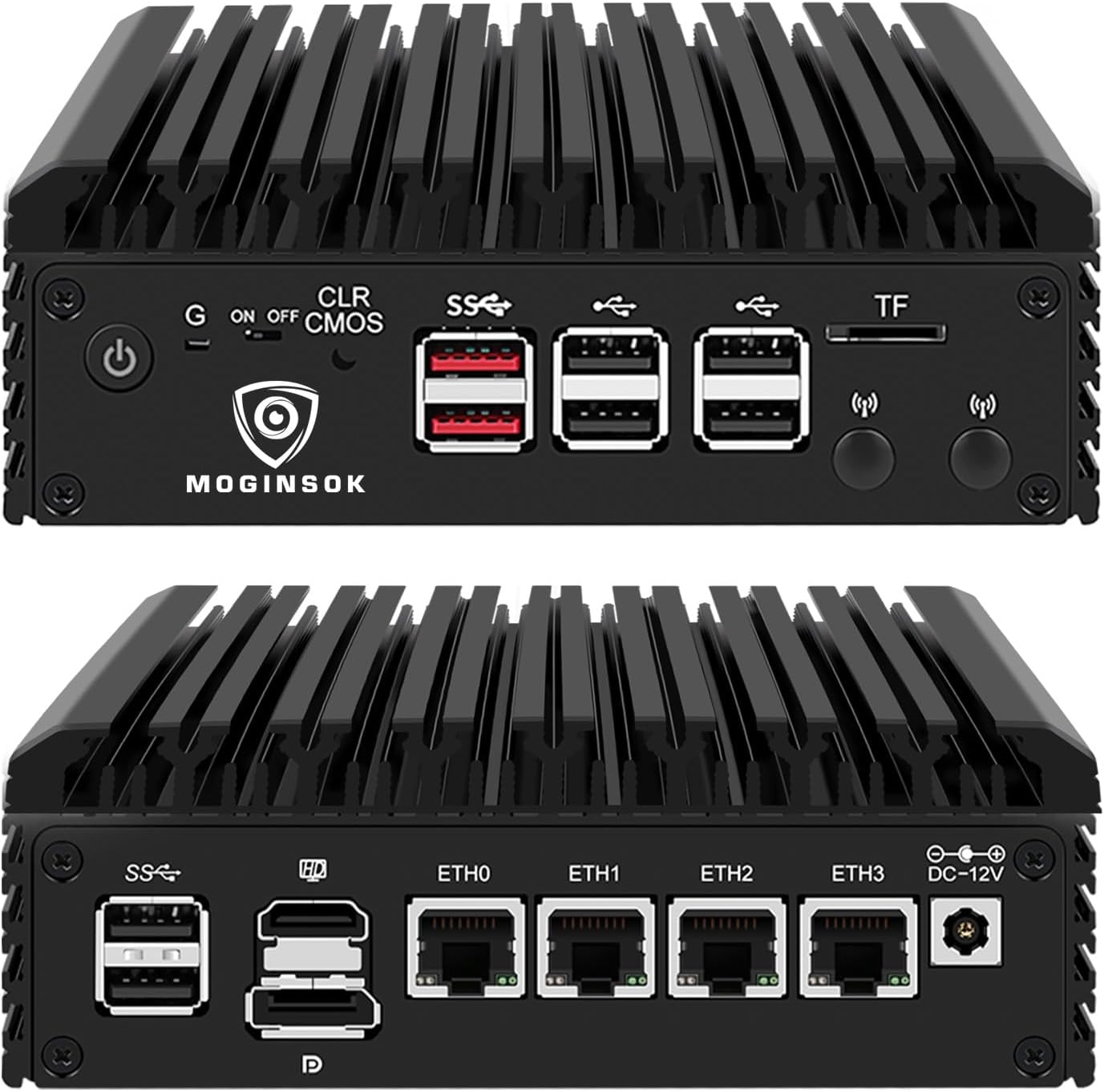


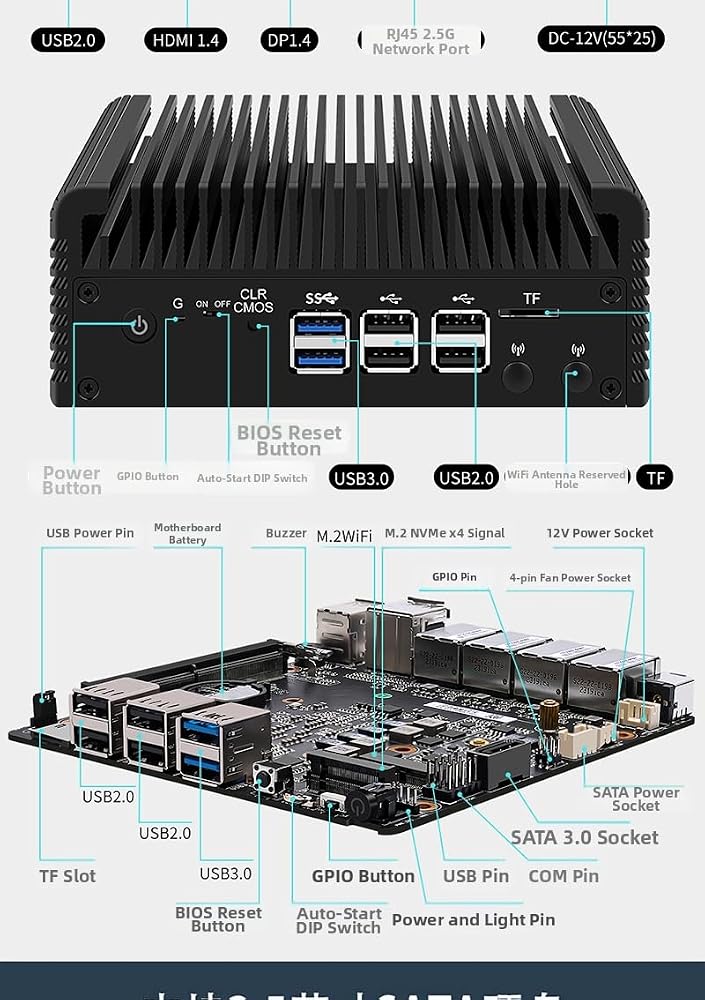


Set any N100 box's spec sheet beside Intel's datasheet and the same handful of errors turns up again and again. Most are harmless typos. These six N100 mini PC mistakes cost buyers money or a return.
A seventh trap is softer. Spec tables print CPU speeds of 1GHz, 2.7GHz or even 240GHz for the same part. The N100's real figures are a 3.4GHz boost and a low idle clock, and every retail N100 runs them.
Industrial boxes add a last wrinkle. RS232 COM ports, a VGA output and a watchdog timer are real features for a kiosk or a CNC controller, and dead weight on a home desk.
If a detail matters, check it in two places: the product name and a photo of the port panel. When they disagree, the photo usually wins.
The plain Mini S12 measures 115 × 102 × 41mm, just under half a litre. That is the N100's real selling point: desktop-class office performance in a box that bolts to the back of a monitor with the included VESA plate.
Small also means frugal. Whole N100 systems typically idle somewhere around 6–10W at the wall and draw roughly 20–30W flat out, depending on the maker's power limits, the SSD and what hangs off the USB ports. Run one around the clock at 8W and it uses about 70kWh a year. A typical desktop tower idles several times higher, before its graphics card wakes up.
For a machine that will run 24/7, the power consumption figures come first. Planning to add memory or drives points to the N100 spec breakdown, and the price bands show what each configuration costs this month.
Form factor is the other half of small. A stick hangs off an HDMI port, a half-litre box hides behind a monitor, and a firewall appliance of 0.6 to 1.3 litres sits flat on a shelf with its ports facing out.
The chip itself is a known quantity. Intel publishes its cores, clocks, memory types and display limits, so any Intel N100 mini PC review can skip the chip and judge the parts around it: memory type, storage slots, ports, cooling and power input. That is a checklist rather than a leap of faith, which suits a market where thirty brands sell one processor.
When no finished box fits, N100 Mini-ITX boards let you build your own, and the Raspberry Pi 5 comparison covers going smaller still.
By last month's sales, the Beelink Mini S12 Pro with 16GB of DDR4 and a 500GB SSD. For silence the MeLE Quieter 4C wins, and for a firewall a four-port Intel i226 box such as the CWWK.
16GB for desktop use. The chip is single-channel, so more memory adds capacity rather than speed. Go to 32GB only for virtual machines, on a box with a SO-DIMM slot.
Intel sells it as the Intel Processor N100, without the Celeron or Pentium name. Many spec sheets still say Celeron out of habit; it is the same chip.
Yes. The N100 is on Microsoft's supported processor list, and several boxes here ship with Windows 11 Pro preinstalled. Others ship with Home or with no operating system.
For office work, streaming and home-server jobs, several years; the limit is usually memory, so buy 16GB. Its hardware AV1 decode keeps it current for streaming video.
The N150 already replaces it at the same power rating with slightly higher clocks. Buy whichever costs less for the same memory and storage; the everyday difference is small.
N95 and N150 boxes that sell alongside the N100. Same four-core family, different clocks and power limits.


