
CWWK 4-Port Firewall Mini PC
CWWK's configured box ships with 8GB DDR5 and a 128GB NVMe drive on four i226-V ports.
- Actively cooled
- 4 LAN ports

One of the few N100 router boxes that arrives with memory and storage already fitted. The catch sits in the network chips: four Realtek RTL8125BG controllers where most rivals use Intel i226-V.
This box does the same job as a dozen other N100 firewalls, with one difference that decides everything: its four 2.5GbE ports run on Realtek RTL8125BG controllers. Most competing four-port boxes use Intel i226-V. The choice matters less for raw speed than for which router operating system treats the chips as first-class citizens.
On Linux the RTL8125 family is handled by the in-kernel r8169 driver, so OpenWrt, iStoreOS, VyOS, Debian and Proxmox see all four ports without extra work. HEIGAOLAPC leans the same way and pitches iStoreOS as the showcase install, with its web UI for port editing and plugins. FreeBSD is the awkward one. OPNsense and pfSense both run on it, and Realtek 2.5GbE support there has leaned on Realtek's own vendor driver, which OPNsense packages as an optional plugin.
Hardware offloading is on the feature sheet too. On pfSense and OPNsense the long-standing advice is to leave checksum, TSO and LRO offloads switched off for a router anyway, so treat it as a Linux-side feature. VLAN tagging and link aggregation are standard on this chip and work on any of the systems above.
| Spec | Value |
|---|---|
| Processor | Intel N100 (Alder Lake-N), 4 cores / 4 threads |
| Clock / cache | Up to 3.4GHz burst, 6MB cache |
| TDP | 6W |
| Graphics | Intel UHD Graphics (integrated) |
| Memory | 8GB installed |
| Storage | 128GB SSD |
| Expansion | M.2 SSD slot (NVMe or SATA); TF card slot up to 512GB |
| Ethernet | 4× 2.5GbE, Realtek RTL8125BG |
| Network features | VLAN tagging, link aggregation, hardware offloading; no SR-IOV |
| Video | 2× HDMI 2.0, dual 4K@60Hz |
| Other ports | USB 3.2, full-function USB-C, audio jack |
| BIOS | Unlocked; Auto Power On, Wake-on-LAN, PXE boot |
| Cooling | Fanless, passive, 0dB |
| Dimensions | 162 × 118.5 × 30mm |
| Weight | 0.5kg |
| Operating system | Windows 11 preinstalled |
| Compatible with | OpenWrt, iStoreOS, pfSense, OPNsense, VyOS, Untangle, Debian, Ubuntu, Proxmox, ESXi, XCP-ng |
| Warranty | 1 year |
Nearly every other four-port N100 firewall is sold barebone: you buy the chassis, then hunt for a DDR5 SO-DIMM and an NVMe drive. This one arrives with 8GB of memory and a 128GB SSD installed, plus Windows 11 on the drive. Wipe it, flash your router OS, and it is on the network the same afternoon.
For a firewall, those numbers are more than enough. A router OS with DNS filtering, a VPN endpoint and a few plugins uses a fraction of 8GB, and a 128GB SSD holds years of logs. The limits appear when the box turns into a small server.
| Role | Fits as shipped? | What to change |
|---|---|---|
| OpenWrt or OPNsense router | Yes | Nothing |
| Router plus Pi-hole, WireGuard, UniFi controller | Yes | Nothing |
| Proxmox with a router VM and two or three containers | Tight on storage | Larger NVMe |
| Proxmox with several full VMs | Memory runs out first | Bigger SO-DIMM, if the board takes it |
Inside sits an M.2 slot that takes NVMe or SATA drives, and on the case a TF card slot for cards up to 512GB. HEIGAOLAPC does not say plainly whether the 128GB drive occupies that M.2 slot or sits beside it. Plan on replacing the drive, not adding a second one, until you have opened the case.
At 162 × 118.5 × 30mm and half a kilo, this is one of the flattest N100 firewall boxes around. The usual finned brick stands closer to 40–55mm tall. Thin looks tidy in a network cabinet, but a passive case sheds heat only through its own surface, so it needs somewhere to put that heat.
The N100's 6W TDP keeps the thermal load small at idle, and a router spends most of its life idle. Under sustained load, such as an IDS scanning every packet or a VM compiling something, the case gets properly warm to the touch. That is normal for fanless hardware; the throttling point is set by the chip, and a cramped shelf reaches it sooner.
Wall power depends on how many ports are linked, the SSD and the memory, rather than on the CPU alone. Typical idle and load ranges for firewall boxes like this one are laid out under N100 power consumption. The practical point: it costs very little to leave it running 24/7.
Two HDMI 2.0 ports at 4K@60Hz and a full-function USB-C port are unusual on a router box. They make the first install easy, because you plug in a monitor instead of fighting a serial console. They also give the box a second life as a quiet desktop or signage player if your network outgrows it, alongside the other fanless N100 mini PCs.

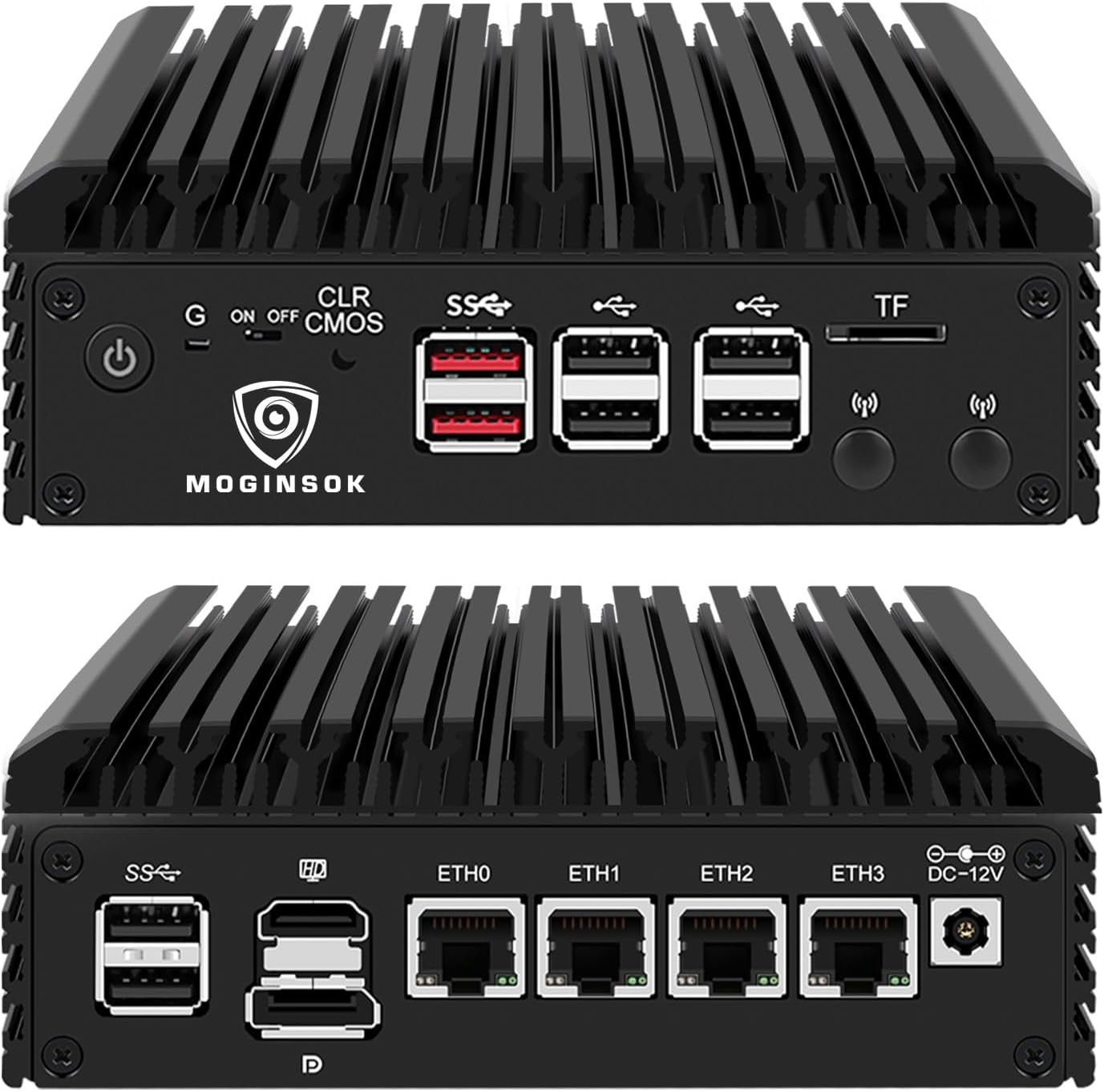
The comparison with its Intel-based neighbours is straightforward. If your plan is OpenWrt, iStoreOS, VyOS or a Linux router on Proxmox, the Realtek chips are a non-issue and the preinstalled memory and SSD save a parts order. If your plan is pfSense or OPNsense, an i226-V box removes one variable from a device that must never drop your connection.
The CWWK firewall comes in a configured version with 8GB and 128GB on Intel i226-V ports, the closest like-for-like swap. The Dozlzyp and oaknode boxes are fanless i226-V units sold barebone, cheaper to start but needing parts. The whole field is lined up under N100 firewall mini PCs.
One line of the maker's spec sheet names the graphics as UHD Graphics 600. That is an error: the N100 uses Intel UHD Graphics with 24 execution units, as set out in the N100 specs. It changes nothing for routing, but it shows how carefully to read the rest of the sheet.
HEIGAOLAPC lists OPNsense as compatible. Its four ports are Realtek RTL8125BG, so install OPNsense's Realtek driver plugin and test the links before putting it in front of your network.
Yes. It ships with 8GB of memory and a 128GB SSD, with Windows 11 installed.
It has no fan, so it makes no noise. The aluminium case gets warm under sustained load, which is how passive cooling works.
Proxmox, ESXi and XCP-ng are all supported, without SR-IOV. For more than a router VM and a few containers, plan on a larger SSD.