
Montvfieto 4-Port Firewall
Montvfieto's fanless barebone lists the same four i226-V ports, 8 USB, SATA and 1–4 NVMe support.
- Silent, fanless design
- 4 LAN ports
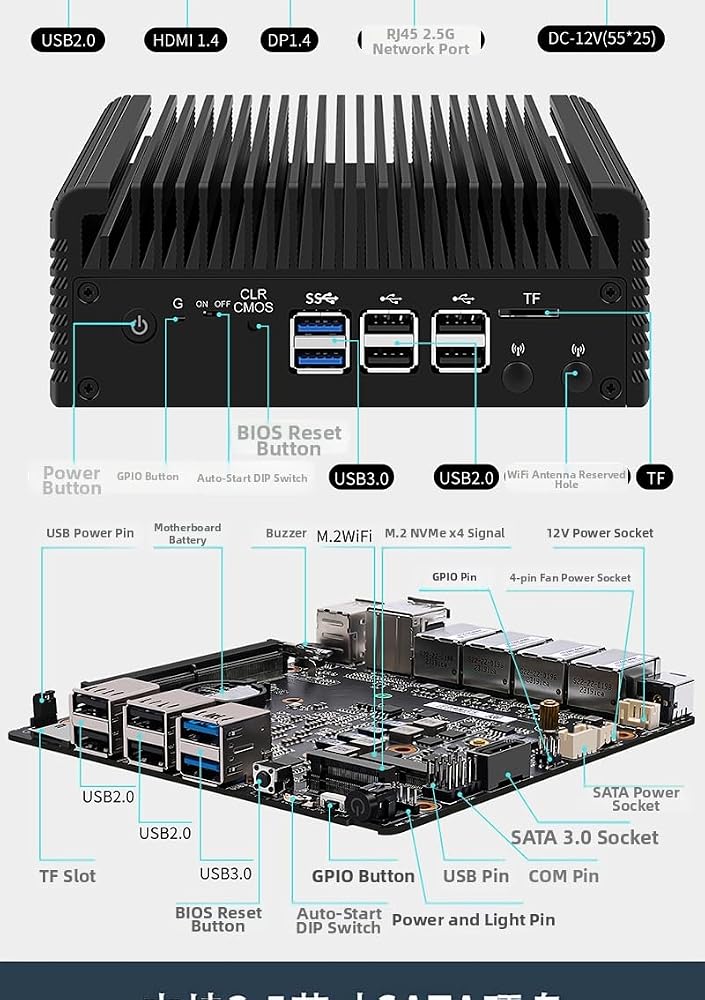
oaknode's four-port micro appliance is a fanless N100 barebone with more storage and memory headroom than most: NVMe x4 and x1 slots, a SATA port with its cable, a DDR5 slot rated to 48GB, and a header for an optional 80mm fan.
Most fanless firewalls leave you two choices: trust the fins or improvise. oaknode's appliance runs passively out of the box and adds a third option, a 12V 4-pin header sized for an 80 × 10mm fan, with the fan cable already in the package. It stays silent until you decide it should not be.
The N100's 6W TDP means passive cooling copes with ordinary router work indefinitely. The fan option is for the situations where heat has nowhere to go: a closed wall cabinet, a loft in summer, or a box running Suricata across every interface while also hosting a couple of VMs.
Idle draw depends mostly on how many ports have a link, the SSD and the memory; a small fan adds little on top. Hedged ranges are collected under N100 power consumption.
Fanless hardware always runs warm to the touch under load. That is the case doing its job, not a warning sign. More on heat and throttling in passive boxes lives under fanless N100 mini PCs.
| Spec | Value |
|---|---|
| Processor | Intel N100, 4 cores / 4 threads |
| TDP | 6W |
| Graphics | Intel UHD Graphics |
| Memory slot | 1× DDR5 SO-DIMM, 4800MHz, up to 48GB |
| NVMe slot 1 | M.2 2280, PCIe 3.0 x4 |
| NVMe slot 2 | M.2 2280, PCIe 3.0 x1 |
| NVMe support | One to four drives, per oaknode |
| SATA | 1× SATA 3.0 for a 2.5-inch SSD or HDD, cable included |
| Card slot | TF card, for storage and system boot |
| Ethernet | 4× 2.5GbE, Intel i226-V, filtered RJ45 jacks |
| Video | HDMI + DP, dual 4K@60Hz |
| USB | 2× USB 3.0, 6× USB 2.0 |
| Encryption | AES-NI |
| Cooling | Fanless; header for a 12V 4-pin 80 × 10mm fan |
| BIOS | Delete key for setup; Auto Power On, Wake-on-LAN, GPIO, PXE boot |
| Supported systems | OPNsense, OpenWrt, Linux, ESXi |
| In the box | Appliance, power adapter, SATA 3.0 cable, 12V 4-pin fan cable |
| Configuration | Barebone: no RAM, no SSD |
Storage is the other thing this chassis does better than the typical four-port box. There are two M.2 2280 NVMe slots on the board, one on PCIe 3.0 x4 and one on PCIe 3.0 x1, and a SATA 3.0 port for a 2.5-inch drive with the cable included. A TF card slot can hold data or boot a system.
| Slot | Interface | Good for |
|---|---|---|
| M.2 #1 | NVMe, PCIe 3.0 x4 | Boot drive, VM storage |
| M.2 #2 | NVMe, PCIe 3.0 x1 (about 985MB/s) | Mirror partner, logs, backups |
| SATA | SATA 3.0, 2.5-inch | Bulk storage, packet captures |
| TF card | Card slot | Rescue image or config backups |
Two native NVMe slots mean a mirrored ZFS boot pool with no adapters. OPNsense and Proxmox both install onto a mirror, and a router whose boot drive fails without a mirror takes the whole house offline until someone reinstalls.
oaknode quotes support for one to four NVMe drives. The two native slots account for two. Going beyond that depends on adapter hardware, so ask oaknode which adapter it means before planning a four-drive layout. For a router that also serves files, the trade-offs are laid out under N100 home servers.
Put the boot drive in the x4 slot if you use only one. A router barely touches it, but a Proxmox host reading VM disks will notice the extra bandwidth.
The single SO-DIMM slot takes DDR5 at 4800MHz, and oaknode rates it for up to 48GB. Intel's own specification for the N100 lists 16GB as the maximum, but boards like this one regularly run larger modules, and 48GB single-module DDR5 SO-DIMMs exist. On a router that doubles as a hypervisor, that ceiling earns its keep.
A pure firewall needs nowhere near that. OPNsense with DNS filtering and a VPN endpoint is comfortable in 8GB. The large ceiling matters once the router runs as one VM among several on Proxmox.
The N100 runs one memory channel whatever you fit, so a single large stick costs nothing in bandwidth against two smaller ones. The first boot after a memory change can sit on a blank screen while the board trains the module; give it a minute.
Four i226-V ports with filtered jacks handle the networking, on FreeBSD's native igc driver. OPNsense, OpenWrt, Linux and ESXi are the systems oaknode names; pfSense from 2.7 onward uses the same driver. AES-NI speeds IPsec and OpenVPN with AES ciphers.


Several fanless four-port N100 barebones share a family resemblance, and the Montvfieto box matches this one's port and slot layout almost line for line. The differences that matter are in what each maker states and includes. oaknode states the 48GB memory rating and ships both the SATA cable and the fan cable.
That makes the Montvfieto four-port the closest substitute, with the caveat that its spec sheet names a Twin Lake chip and a 3.8GHz clock, so check which processor it carries.
The Dozlzyp appliance takes a different route: a lengthened aluminium chassis, two NVMe slots, TPM 2.0 and a 32GB memory ceiling, with versions that add COM ports. The CWWK box suits anyone who would rather unbox it with memory and an SSD already fitted.
Eight USB ports, two of them USB 3.0, are more than a router needs, but they help when the box turns into a small server with a UPS, a Zigbee stick and a backup drive attached. HDMI and DisplayPort both drive 4K@60Hz for install day and rescue work.
Barebone means a two-item shopping list: one DDR5 SO-DIMM and at least one M.2 2280 NVMe drive. Enable Auto Power On in the BIOS, reached with the Delete key, so the router comes back by itself after a power cut. The wider field of router boxes is compared under N100 firewall mini PCs.
Yes, it cools passively. It also has a 12V 4-pin header for an optional 80 × 10mm fan, and the fan cable comes in the box.
One DDR5 SO-DIMM at 4800MHz, rated by oaknode for up to 48GB. It ships without memory.
Yes. It has two native M.2 2280 NVMe slots, one PCIe 3.0 x4 and one x1, so a ZFS mirror needs no adapter.
This build is the N100. The same chassis also comes with the N150, so confirm the processor if you need an exact match.