
CWWK 4-Port Firewall Mini PC
CWWK's configured firewall with 8GB DDR5, a 128GB NVMe drive and four i226-V ports.
- Actively cooled
- 4 LAN ports
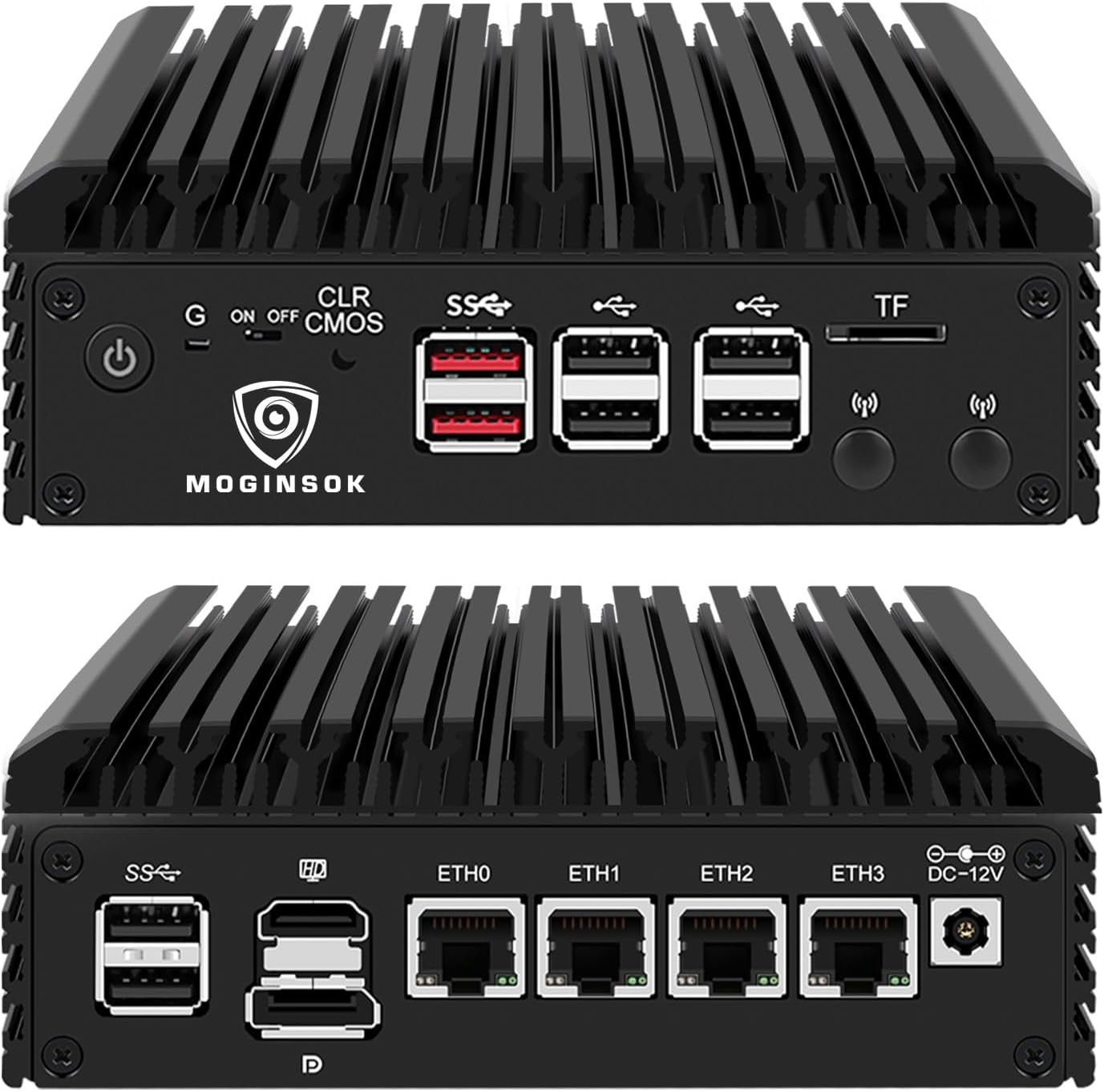
The MGSRN100 is a fanless four-port router box with Intel I226 network chips, DDR5 memory and a PCIe 3.0 SSD already installed. Its name says N100; current production swaps in the Twin Lake N150.
MOGINSOK builds this appliance around the N100 and still names it after the chip, but current units ship with the Intel N150. The N150 is Intel's Twin Lake refresh of the same design. For a router, that swap is small and mostly in your favour, as long as you know it is coming.
Both chips use four Gracemont efficiency cores with no Hyper-Threading, 6MB of cache and a 6W TDP. The N150 raises the burst clock from 3.4GHz to 3.6GHz and the graphics clock from 750MHz to 1000MHz. Packet filtering, NAT and VPN scale with those cores, so expect the same class of routing throughput with a little extra headroom.
The chip-by-chip differences, including benchmarks that are public and repeatable, are set out in N100 vs N150. The short version for firewall duty: nothing you rely on gets worse.
Here the firmware outranks the silicon. An N150 on a board first designed for the N100 needs a BIOS that knows the newer chip, and MOGINSOK hands out BIOS updates on request. Update the BIOS before the first router install, while the box still has a monitor attached.
| Spec | Value |
|---|---|
| Model | MGSRN100 |
| Processor | Intel N100 (Alder Lake-N) platform; current units ship with the N150 |
| Cores / clock | 4 cores / 4 threads, up to 3.4GHz (N100) |
| TDP | 6W |
| Graphics | Intel UHD Graphics |
| Memory | 8GB DDR5 |
| Memory slot | 1× SO-DIMM DDR5 4800MHz, up to 32GB |
| Storage | 128GB M.2 PCIe 3.0 SSD |
| Storage slot | 1× M.2 PCIe 3.0 |
| Ethernet | 4× 2.5GbE, Intel I226 |
| Video | HDMI 2.1 + DP 1.4, dual 4K@60Hz |
| Security / virtualisation | AES-NI, VT-x, VT-d |
| BIOS features | Watchdog, Auto Power On, RTC wake, PXE boot, Wake-on-LAN |
| Cooling | Fanless, passive |
| Supported systems | pfSense 23.01 / CE 2.7.0 or newer, OPNsense 22.1+, OpenWrt, RouterOS 7, ESXi, Proxmox, Ubuntu, Windows 10/11 |
| Warranty | 12 months |
The four 2.5GbE ports run on Intel I226 controllers, the chip most homelab router builders ask for by name. FreeBSD's igc driver handles them, which is why pfSense and OPNsense treat this family as native hardware. The only condition is a recent enough release.
MOGINSOK spells out the minimum versions it recommends for I226 support. Older installers either miss the ports or behave oddly, so start from a current image.
| System | Recommended version | Notes |
|---|---|---|
| pfSense | Plus 23.01 or CE 2.7.0+ | igc driver, all four ports |
| OPNsense | 22.1 or newer | Native support |
| OpenWrt | Current release | igc in kernel |
| RouterOS | v7 | x86 install |
| Proxmox / ESXi | Current release | Pass ports to a router VM with VT-d |
AES-NI is present, and it helps some VPNs more than others. IPsec and OpenVPN with AES ciphers lean on it heavily. WireGuard uses ChaCha20 instead, which runs fast on these cores anyway, so neither choice is a bad one on this box.
Four ports cover the classic layout with room to spare: WAN, LAN, a guest or IoT network, and one spare for a second ISP or a management link. Every port runs at 2.5GbE, so a multi-gig fibre handoff and a 2.5GbE switch both link at full speed. Gigabit devices negotiate down without fuss.
The configuration is 8GB of DDR5 in a single SO-DIMM slot and a 128GB SSD on a PCIe 3.0 M.2 slot. MOGINSOK also builds the same chassis as a barebone for people who prefer their own parts. The slot takes DDR5 at 4800MHz and up to 32GB.
One memory slot sounds stingy, but the N100 and N150 run a single memory channel in any case. A second slot would add capacity, not bandwidth. For a pure firewall, 8GB is generous; for a Proxmox host running a router VM plus a few containers, 16GB or 32GB is the upgrade that matters.
There is one M.2 slot and no second drive bay. That rules out a mirrored boot pool and caps local storage at whatever single NVMe you fit. For log retention and a firewall OS, 128GB covers it; for a router that doubles as an N100 home server, a larger drive comes first.
The always-on features are the ones a router needs. A hardware watchdog reboots the box if the OS hangs. Auto Power On brings it back after an outage without anyone pressing a button. RTC wake, PXE boot and Wake-on-LAN round out a BIOS clearly set up for headless duty.
If you fit your own memory, buy a single DDR5 SO-DIMM rated at 4800MHz or faster; the board runs it at 4800. Laptop sticks work, since SO-DIMM is the laptop format. The first boot after a memory change can sit on a black screen while the board trains the new module, so give it a minute before assuming a fault.


The case is a finned aluminium block with no fan, which suits a cupboard, a desk or a bedroom where the modem lives. Passive cooling on a 6W chip keeps it quiet indefinitely; give it clear air on the fins and it will not complain. HDMI 2.1 and DisplayPort 1.4 drive two 4K@60Hz screens, more than a router will ever need but handy on install day.
Against its neighbours, this box sits in the middle. The CWWK firewall offers a configured 8GB/128GB version on the same I226 chips and names the N100 plainly. The HEIGAOLAPC also ships configured and fanless, but on Realtek NICs. The Dozlzyp box is barebone, longer, and carries two NVMe slots.
Once the router OS is installed, the display outputs rarely matter again. They earn their place when something breaks: a failed update or a lost admin password is fixed faster with a screen and keyboard than over the network. Keep a short HDMI cable near the box for exactly that day.
MOGINSOK covers the box for 12 months and offers BIOS updates on request. Three facts are worth pinning down with MOGINSOK first: the processor inside, whether the 8GB and 128GB are fitted, and which OS sits on the drive. Heat, noise and throttling on passive hardware are covered in more depth under fanless N100 mini PCs.
It is designed around the N100 and named after it, but current units ship with the N150. Same core count and 6W TDP, slightly higher clocks.
MOGINSOK recommends pfSense Plus 23.01 or CE 2.7.0 and newer, or OPNsense 22.1 and newer.
One DDR5 SO-DIMM slot at 4800MHz, up to 32GB. It ships with 8GB.
Yes. It supports VT-x and VT-d, so you can pass the I226 ports through to a router VM.